What TagBot does.
A setlist tagger for live recordings. Built to keep you in control of what gets written.
Show detection from folder name and metadata
TagBot reads folder names and embedded audio metadata to identify the show date. It handles common taper naming conventions: YYYY-MM-DD, MM-DD-YYYY, and variations with venue or source info appended. When detection is ambiguous, it shows you what it found and asks you to confirm before proceeding.
Supported: 2024-07-20 · 2024.07.20 · 07-20-2024 · with venue suffix
Setlists from DMBAlmanac and Phish.net
DMB shows pull the official setlist from DMBAlmanac.com, including set structure (set 1, set 2, encore), segues, and multi-part songs. Phish shows pull from Phish.net using the same workflow. If your parent folder contains a mix of DMB and Phish show subfolders, TagBot detects each and routes it to the correct provider automatically.
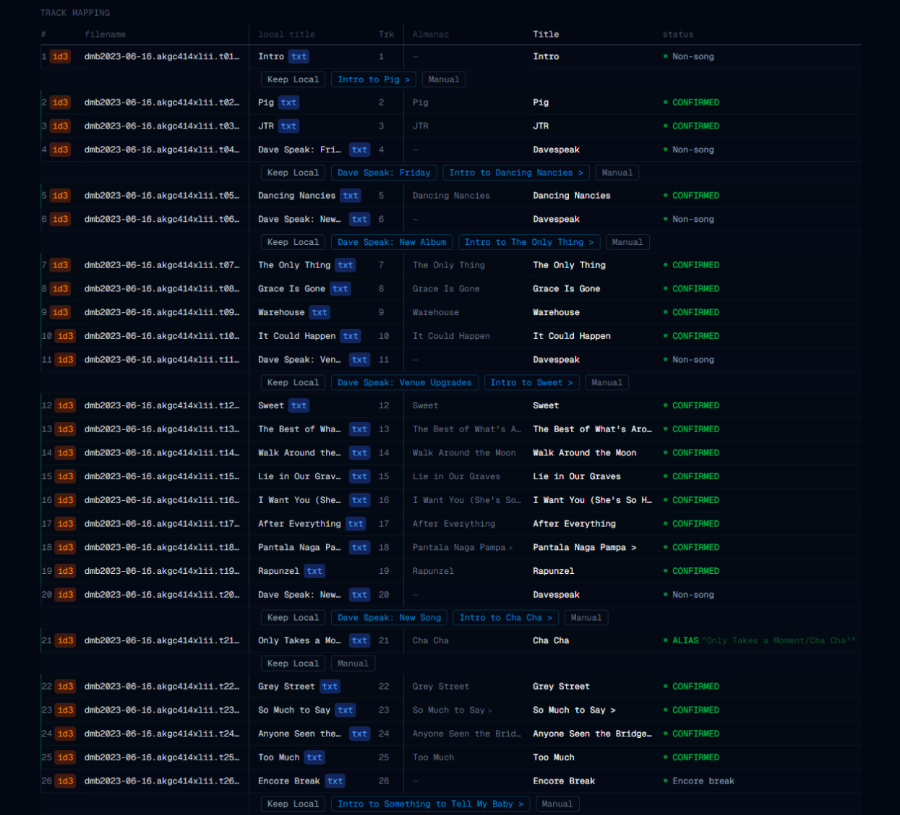
If your recording has more or fewer tracks than the setlist, TagBot shows you the discrepancy instead of guessing — you can manually assign or skip tracks before writing anything.
Every match visible before write
The tagger UI shows a side-by-side comparison for each track: the current tag value versus what will be written. Tracks that match cleanly are marked ready. Tracks TagBot isn't sure about — wrong duration, ambiguous title, unusual track count — are flagged for your review. You can override any individual match before approving the batch.
Standard ID3v2 tags
TagBot writes six fields:
- TITLE—song title from setlist
- ARTIST—performer (e.g., Dave Matthews Band)
- ALBUM—show date and venue in standard format
- COMMENT—source reference (setlist provider URL)
- TRACKNUMBER—track position in the final write order
- TOTALTRACKS—total tracks written for the show
TRACKNUMBER and TOTALTRACKS reflect the final write order, not the raw file position. All other existing tags (e.g., ENCODER, REPLAYGAIN) are left untouched.
Write history and one-click restore
Every write session is logged with a timestamp, the folder path, and the exact changes made to each file. The History view shows all past sessions. Select any session and restore — TagBot writes back the previous tag values exactly as they were.
Process multiple shows in one pass
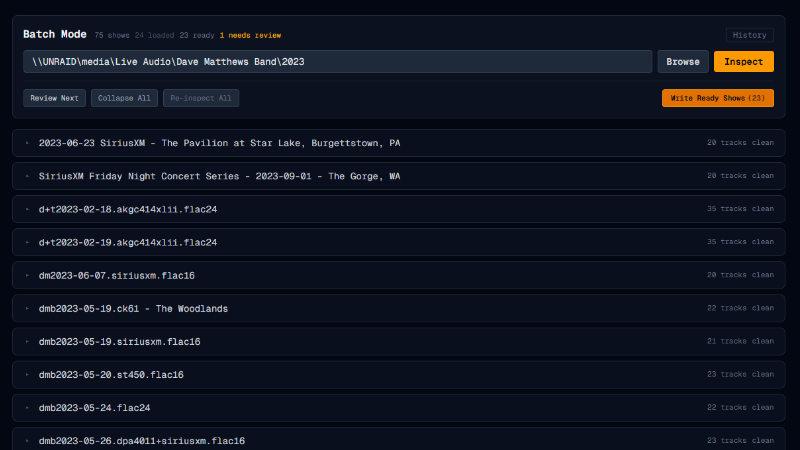
Point TagBot at a parent folder. It discovers all show subfolders and inspects each one against the setlist. Shows that match cleanly are marked ready. Shows with uncertain matches or track count discrepancies are flagged for review. Ready shows can be written together in one click — flagged shows stay queued until you've reviewed them first.
What TagBot does not do
- · It does not rename or move your audio files
- · It does not modify your folder structure
- · It does not use AI or machine learning
- · It does not require an internet subscription or account
- · It does not upload your audio to any server
- · It does not work with arbitrary music libraries — it is setlist-aware, not general-purpose